Last updated: 5 September 2026
Subnautica 2 Co-op Guide — Play Multiplayer With Friends
Subnautica 2 was built from the ground up to support co-op play for up to four players — a first for the series. Whether you want a friend to share the early terror of an alien ocean or a full team to build an elaborate deep-sea base together, the multiplayer system is designed to feel seamless. This guide explains exactly how to start and join sessions, what players share, and the strategies that make co-op feel like a feature rather than a complication — including the proximity chat, trading, and revive mechanics added in the Update 1.2 'Buddy System' patch.
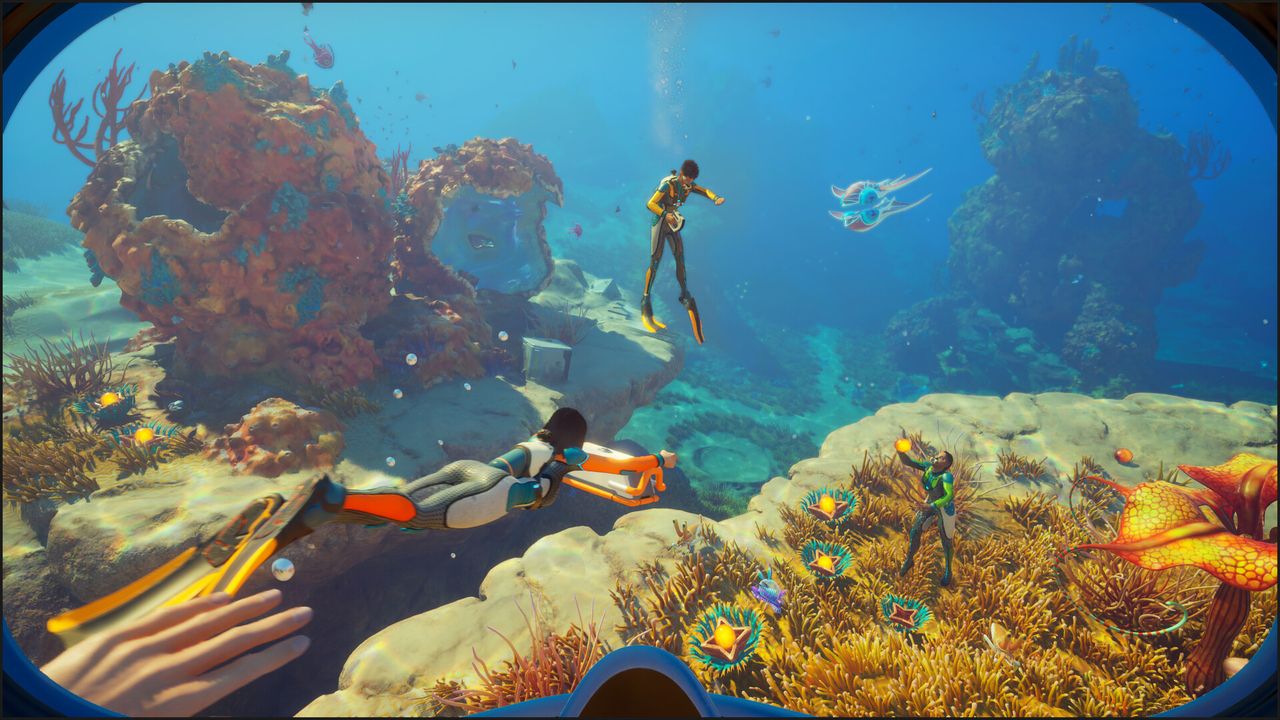
Subnautica 2 supports up to 4 players (one host plus three friends) in optional online co-op, with cross-platform play confirmed across Steam, Epic Games Store, and Xbox. The host starts the session from the main menu; friends who are Steam friends join via a Steam invite, while friends on other platforms join using an in-game friend code. All players share the same world state, base, and resource pool — coordinate roles early or you'll duplicate effort. Update 1.2 'Buddy System' (August 19, 2026) added built-in cross-platform proximity voice chat, direct player-to-player trading, a revive mechanic, emotes, and two new playable characters, Grace and Jegna. Solo play is equally supported for the full experience, and a solo save can be converted to co-op at any time.
01Starting a Co-op Session
Co-op in Subnautica 2 is hosted by one player — the session host. The host's save file is the authoritative world state; all other players connect to it. When the host exits, the session ends for everyone, and progress is saved to the host's file — the same player needs to host again to continue that save with the group.
How to start or join a session:
- Host: from the main menu, select Host Multiplayer and start a new game (or load an existing save and convert it, see below), then choose Survival or Creative mode. This starts the session.
- Join via Steam invite: if you and the host are Steam friends, the host can send an invite from the in-game friends list; you get a Steam notification and can join with one click.
- Join via friend code (cross-platform): the host can also generate an in-game friend code and share it with you directly. Enter it under Join Friends on the main menu. This is how players on different platforms (Steam, Epic Games Store, Xbox) connect, since Subnautica 2 supports cross-platform play.
- No public matchmaking: there's no way to browse or drop into a stranger's session — you always join via a direct Steam invite or the host's friend code.
Unlike some early reports suggested, you can convert an existing single-player save into a co-op save at any time — select it from the load screen and choose the convert-to-multiplayer option, rather than having to decide before your first session. Whoever converts and hosts the save is the one who needs to host it each time the group continues playing.
02What's Shared Between Players
Understanding what is shared and what is individual prevents frustrating miscommunication in a co-op session.
Shared between all players:
- World state — all resources, creatures, biome changes, and wrecks are in the same world. If one player breaks a Limestone Outcrop, it's gone for everyone.
- Base and all modules — any player with a Habitat Builder can add or remove modules from a shared base. Coordinate before building.
- Fabricator queues — all players share access to any Fabricator in a base. Two players queuing crafts simultaneously works, but material costs are pulled from the shared pool.
- Storage lockers — all lockers in a base are accessible to all players. Set up a convention (e.g. locker labels or designate which player manages which resource type).
- PDA story progress — major narrative events and signals are shared; completing a story trigger for one player updates it for all.
Individual per player:
- Personal inventory — each player has their own inventory and equipment slots.
- Scanner data — scanning a blueprint or creature updates only the scanner of the player who scanned it. Everyone needs to scan key tech themselves.
- Oxygen and hunger/thirst bars — fully individual. One player's air running out doesn't affect others.
- Health — individual. A player who is knocked out by a creature or runs out of oxygen or food goes down rather than respawning instantly — since update 1.2, a nearby teammate has a limited window to revive them on the spot (see the Buddy System section below); if no one reaches them in time, they respawn (or 'reprint') at their assigned Biobed with a resource penalty — typically losing the inventory items they were carrying.
03Update 1.2 'Buddy System' — Proximity Chat, Trading, Revives, and Emotes
Update 1.2, nicknamed Buddy System, shipped on August 19, 2026 and is the biggest co-op-focused update to Subnautica 2 so far. It adds several of the most-requested community features — built-in voice chat, direct item trading, a revive mechanic, emotes, and two new playable characters. Here's how each one works.
- Proximity voice chat — built-in and cross-platform, so no external voice app is needed. Audio is clear at close range and degrades into a radio-static crackle the further apart players get, breaking up almost entirely at long range. You can set it in the options menu to Always On, Push-to-Talk, or Always Off if you'd rather coordinate by text or pings.
- Player trading — walk up to a nearby teammate and hold the interact button to open their inventory directly; you can pull items from their backpack or drop items into it without either of you surfacing or routing everything through a shared base locker. Useful for quickly passing a spare Oxygen Tank or Repair Tool to a diver who's running low.
- Revive mechanic — when a player goes down (creature attack, or running out of oxygen or food), they no longer respawn instantly. A limited time window opens during which a nearby teammate can revive them on the spot; a revived player keeps their equipment and regains a small amount of oxygen, so getting to them quickly is worth it. A downed player can also skip the wait and choose to respawn immediately at their assigned Biobed instead of waiting for a revive.
- Emotes — five emotes (Wave, Clap, Thumbs Up, Thumbs Down, and Frustrated) are available from a new radial emote menu, usable underwater or on land. They're a fast way to signal 'follow me' or flag something without typing, though moving or taking another action interrupts the animation.
- New characters — Grace and Jegna — two new playable character options were added to character customization, alongside two new suit color profiles. The patch notes don't give either character a confirmed backstory or a distinct gameplay role — they're customization options, mainly there so a group of up to four players can visually tell each other apart instead of everyone wearing an identical suit.
04Best Co-op Role Division
Co-op is most efficient when players divide responsibilities rather than all doing the same tasks. Here's a division that works well for a two-to-four player group:
- Builder (1 player) — focuses on base construction, hull integrity management, and setting up power systems. This player reads the base stats and calls when reinforcement is needed before others add new modules.
- Resource farmer (1–2 players) — dives for materials and fills shared storage. Communicates which resources are low and handles Scanner Room operations.
- Explorer (1 player) — scouts new biomes, scans creatures and flora, and identifies where the next resource or story objective is. This player takes the most risk and benefits most from the Stasis Rifle and Repulsion Cannon.
- With 4 players: add a dedicated Vehicle operator who manages Seamoths and other underwater vehicles, handles Moonpool charging, and provides transport for long-distance resource runs.
These roles aren't mandatory — the game doesn't enforce them — but having one player aware of hull integrity at all times prevents the most common co-op disaster: a well-meaning teammate adding three windows to a base that's already at +1 integrity.
05Co-op Survival Tips
A few practical habits that make co-op sessions smoother:
- Synchronise your scan priorities. Each player needs to scan blueprints individually to craft them. In the first hour, split up in the starting biome — one player scans the northern section, another the south — then meet to compare what you've found.
- Set a shared base chest. Designate one storage locker in your base as a 'drop-off' for all raw materials. Everyone deposits into it; the builder or crafter pulls from it. This prevents two players both mining Titanium while a third is waiting for Copper.
- Call your dives. Before going deep, tell your team so someone can be at the base as a 'home base anchor' — a player who stays shallow and can respond if a diver needs a quick craft or emergency supplies.
- Don't separate indefinitely. If one player goes deep alone, they face the same oxygen and creature risks as solo play. The advantage of co-op is support — stay close enough that a distress call is actionable.
- Vote before major changes. Removing a module from a base, abandoning an outpost, or using rare materials all affect everyone. A quick chat before acting saves friction later.
06Performance and Technical Notes
As an Early Access game, co-op performance in Subnautica 2 may vary with update versions. A few things worth knowing:
- The host's machine determines server performance. If the host has a slower PC or poor internet connection, all players may experience higher latency and stuttering. A player with a stronger machine and stable connection should usually host.
- Save frequency: the game autosaves on the host's file at regular intervals. Non-host players do not have their own save — if the host exits unexpectedly, all unsaved progress is lost. Hosts should save manually after major milestones.
- Re-joining mid-session: players who disconnect can rejoin an active session from the Steam friends list or a new invite, appearing at the base or their last position.
- Version matching: all players must be on the same game version to connect. If one player is on a newer patch, Steam should auto-update everyone when they launch.
- Shiver Leviathan (fixed in update 1.1): a bug in earlier EA builds caused the Shiver Leviathan to not attack non-host players, making it effectively harmless to guests while threatening only the host. This was corrected in update 1.1 'Adaptive Measures' (July 8, 2026) — the Shiver Leviathan now attacks all players in a session equally.
Check the official Subnautica 2 patch notes and community forums for any co-op specific bugs or performance updates relevant to the current version — Early Access updates can change this significantly between patches.
FAQ
How do I play co-op in Subnautica 2?
Select Host Multiplayer from the main menu to start a session (or convert an existing single-player save to multiplayer from the load screen). Friends who are Steam friends can join via a Steam invite; friends on other platforms join using an in-game friend code the host generates, since Subnautica 2 supports cross-platform play across Steam, Epic Games Store, and Xbox. Up to 4 players total can be in one session.
Can you play Subnautica 2 solo?
Yes. Subnautica 2 is fully designed for solo play and the entire game — including all story content, all biomes, and all craftables — is accessible in single-player mode. Co-op is strictly optional and adds no content that is unavailable in solo.
Do all players share resources in Subnautica 2 co-op?
Yes. The game world, all resources, all base storage, and all Fabricators are shared among all players in a session. Personal inventories and individual oxygen/hunger bars are still per-player, but anything stored in a base or dropped in the world is accessible to everyone.
What happens if the host leaves in Subnautica 2 co-op?
The session ends for all players when the host exits. Progress is saved to the host's file, and any unsaved progress since the last autosave is lost for everyone. There is no session migration to a different host — the same player who converted or started the save needs to host it again each time the group continues playing it. If the host needs to leave, manually save before quitting.
How many players can play Subnautica 2 co-op?
Up to 4 players: one host and three guests. This is confirmed by Unknown Worlds' own Subnautica 2 support page as the Early Access co-op limit — check the official notes if the player cap changes in later updates.
Is cross-play supported in Subnautica 2?
Yes. Subnautica 2 launched in Early Access on Steam, Epic Games Store, and Xbox Series X|S (May 2026), and Unknown Worlds' official support page confirms cross-platform play: friends on different platforms join the same session via an in-game friend code, and save games can be shared across platforms.
Does Subnautica 2 have voice chat?
Yes, since update 1.2 'Buddy System' (August 19, 2026). Subnautica 2 has built-in, cross-platform proximity voice chat — no external voice app needed. Audio is clear when players are close and degrades into radio static the further apart you get. You can set it to Always On, Push-to-Talk, or Always Off in the options menu.
Can you trade items with other players in Subnautica 2?
Yes, since update 1.2. Walk up to a nearby teammate and hold the interact button to open their inventory directly — you can pull items from their backpack or drop items into it, no need to route everything through a shared base locker.
Can you revive a downed teammate in Subnautica 2?
Yes, since update 1.2. If a player is knocked out by a creature attack or by running out of oxygen or food, they don't respawn instantly — a nearby teammate has a limited time window to revive them on the spot, and the revived player keeps their equipment and regains a small amount of oxygen. If no one reaches them in time, or they'd rather not wait, they can choose to respawn immediately at their assigned Biobed instead.
Who are Grace and Jegna in Subnautica 2?
Grace and Jegna are two new playable character options added in update 1.2, alongside two new suit color profiles. The patch notes don't give either character a confirmed backstory or a distinct gameplay role — they're character customization options, mainly added so a group of up to four co-op players can visually tell each other apart instead of everyone wearing an identical suit.
Sources
Where the facts on this page were checked. If one of them now says something different, we want to know — tell us and we will fix the guide.
- Subnautica 2 Buddy System Update (Early Access 1.2 patch notes) Unknown Worlds Entertainment
- Subnautica 2 Adaptive Measures Update (Early Access 1.1 patch notes) Unknown Worlds Entertainment
- Does it support multiplayer or co-op? Subnautica 2 Help Center (Unknown Worlds / Krafton)
- Subnautica 2 Subnautica 2 Wiki
- How To Play With Friends In Multiplayer In Subnautica 2 TheGamer
New & updated guides ship every week. Follow the Atom feed or get notified when new Subnautica 2 guides land.